Most product teams don't go looking for iPaaS until the integration queue is already out of control. By then, engineers are maintaining connectors instead of building features, and the math stops working fast. If that sounds familiar, this is a good place to get clear on what iPaaS is, what it's not, and how to think about it for your team.
TLDR:
- iPaaS is a cloud-hosted layer that connects separate software systems, handling auth, scheduling, and error logic for you
- Companies average 106 SaaS apps each, making custom-built integrations a maintenance trap that pulls engineers off real product work
- Embedded iPaaS differs from standard iPaaS: your customers connect their own tools inside your product, not your internal team's systems
- The iPaaS market sits at $9.24 billion in 2026 and is projected to reach $20.93 billion by 2031, growing at ~17.75% annually
- hotglue is built for the embedded iPaaS use case, with open-source connectors, Python-based transformations, and tenant-based pricing
What iPaaS Is (and Why It Exists)
iPaaS stands for Integration Platform as a Service. Strip away the acronym and it's a cloud-hosted layer that connects separate software systems, moves data between them, and handles the authentication, scheduling, and error handling that would otherwise require custom code for every single connection.
Before iPaaS existed, connecting two systems meant writing a custom integration from scratch every time, then maintaining it forever as APIs changed under you. iPaaS replaces that with a managed, reusable layer: you configure the connections, and it handles the plumbing.
The Scale Problem That Made iPaaS Necessary
Companies globally use an average of 106 SaaS applications, each with its own data model, auth flow, and API quirks. Multiply that across hundreds of customers with different tool stacks, and "just write a custom integration" stops working fast.
The math is brutal: ten connectors for one customer is a project; ten connectors for a hundred customers is a maintenance nightmare. Understanding the different iPaaS integration platforms helps clarify which approach fits your scale. APIs change, tokens expire, schemas shift, and your engineering team ends up babysitting pipelines instead of shipping product.
That's the structural reality iPaaS was built for.
How iPaaS Works Under the Hood
At its core, an iPaaS sits between two systems and does four things: reads data from a source, shapes it, writes it to a destination, and does all of this on a schedule or when something triggers it.
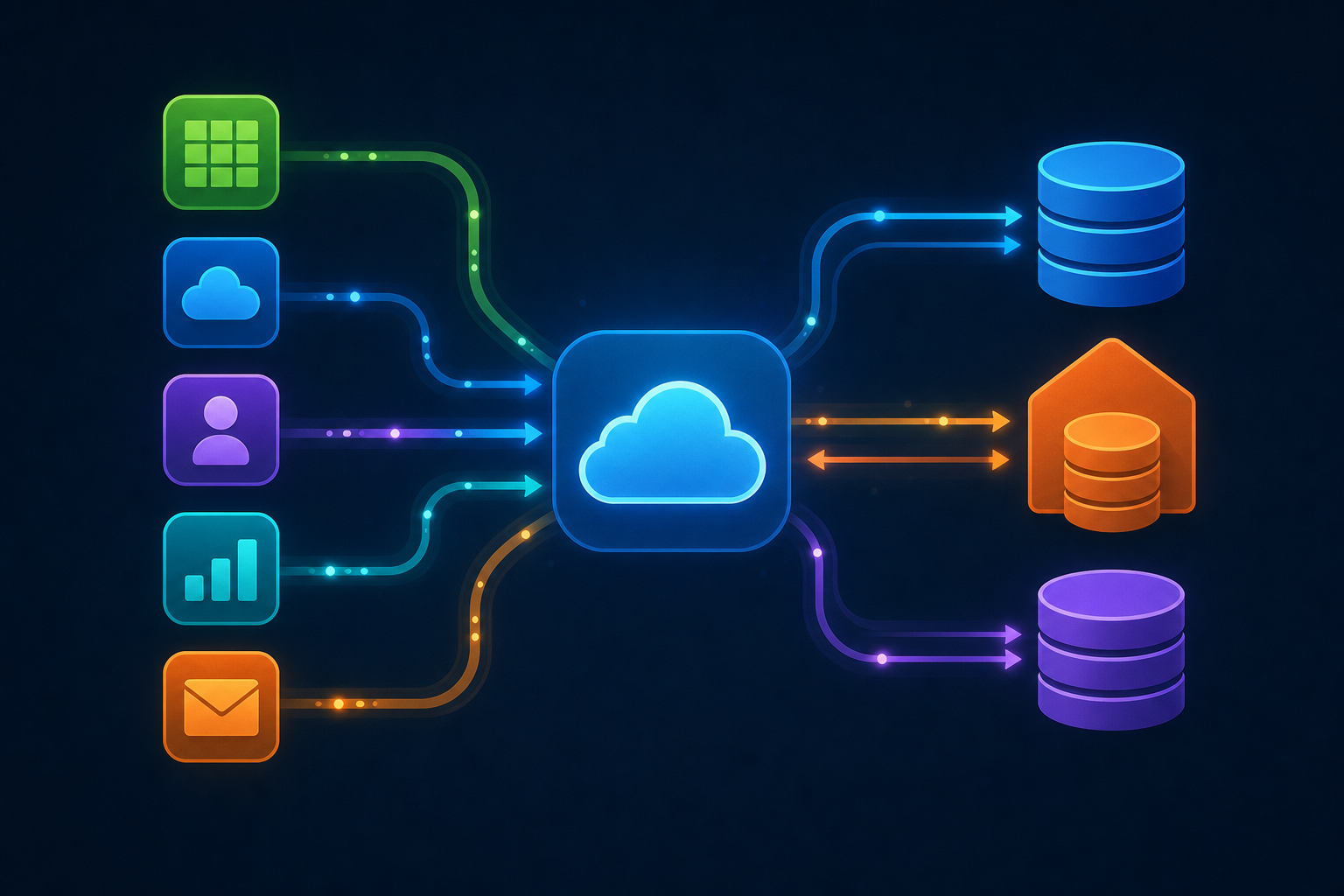
The key moving parts:
- Connectors authenticate with third-party APIs and handle reading and writing data to those services
- Pipelines (or flows) define what moves, in which direction, and how often
- Transformation logic reshapes source data to match the destination's expected format
- Scheduling or event triggers determine when a sync runs, whether that's every hour or when a record changes
The transformation step is where most of the real work happens. Source systems rarely format data the way your backend expects. Field names differ, data types clash, nested objects need flattening. A good iPaaS gives you a mapping layer for simple field translations, plus a code-based escape hatch for complex logic. There's a reason in-house integrations exhaust engineering teams: the transformation and maintenance burden adds up fast.
Scheduling covers the routine cases like syncing QuickBooks nightly or pulling Salesforce every hour. Event triggers cover real-time cases like running a sync when a customer completes onboarding or when a webhook fires from a third-party system.
Core Capabilities to Look For in an iPaaS
Not all iPaaS tools are built the same. Here's what actually matters when you're assessing one:
- Pre-built connector libraries: the broader the catalog, the less you build from scratch. Verify connectors cover your customers' actual tools, beyond the popular ones.
- Data transformation: you need more than field mapping. Look for a code-based layer (Python is the standard) for joins, deduplication, and nested data handling.
- Error handling and retry logic: partial sync failures should never silently pass. A good iPaaS fails loudly, preserves state, and retries cleanly.
- Job monitoring and health visibility: you need to see what ran, when it failed, and which tenants are affected, without digging through raw logs.
- API rate limit management: third-party APIs throttle requests. Your iPaaS should absorb that complexity so your team never has to engineer around it.
- Scheduling flexibility: cron-based scheduling per connector matters. Syncing Salesforce hourly and QuickBooks nightly in the same deployment is a basic requirement, not a premium feature.
- Security and compliance: SOC 2 Type II and GDPR are the baseline. Pay attention to whether the vendor stores your customers' data or just processes and delivers it. These criteria matter when choosing the best embedded iPaaS solution for your team.
iPaaS vs. ESB vs. Middleware: What Is Actually Different
The table below shows where the three approaches actually differ in practice.
| ESB | Traditional Middleware | iPaaS | |
|---|---|---|---|
| Deployment | On-premise, self-hosted | On-premise or hosted | Cloud-hosted, vendor-managed |
| Setup time | Months, requires specialists | Weeks to months | Days to hours |
| Maintenance | Your team owns it | Your team owns it | Vendor handles it |
| Scalability | Manual infrastructure work | Limited | Elastic by design |
ESBs came first, using a hub-and-spoke model where every system talked through a central bus. That worked when companies ran five internal tools with a dedicated integration team. The problem: standing one up took months, required specialized skills, and scaling meant more infrastructure to manage yourself. (A fun era for systems architects. Less fun for everyone else.)
Traditional middleware filled gaps between specific systems but never became a managed service. You still owned the servers, the uptime, and the upgrade cycles.
iPaaS moved all of that to the cloud as a subscription. The vendor runs the infrastructure and manages uptime, removing the overhead that previously required a dedicated internal team.
iPaaS vs. Embedded iPaaS: The Distinction Product Teams Often Miss
Standard iPaaS tools are built for internal IT or RevOps teams. Someone at your company logs into Zapier or Workato, wires up two internal systems, and walks away. Much of this perception ties into the stigma of embedded iPaaS that product teams have had to push past. Your customers never see it.
Embedded iPaaS flips the audience. Your customers connect their own tools inside your product. The integration widget lives within your SaaS UI, and each customer authenticates their own QuickBooks, Salesforce, or Shopify account.
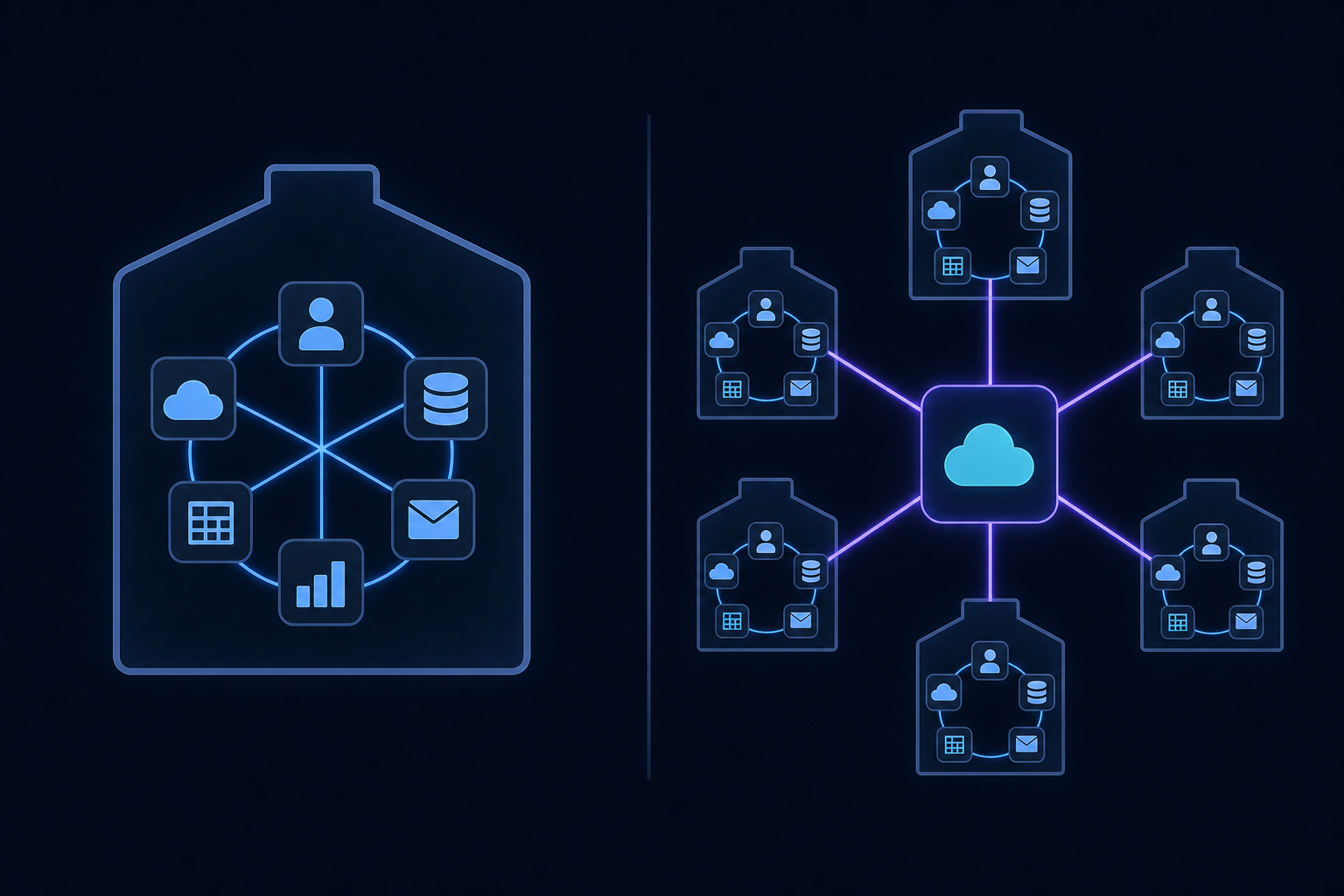
That distinction matters because the architecture, ownership model, and UX requirements are completely different. With embedded iPaaS, you're building a multi-tenant integration layer where every customer has their own credentials, sync history, and data.
- Standard iPaaS: your internal team needs to connect your CRM to your data warehouse, or sync your billing system with your accounting tool.
- Embedded iPaaS: your customers need to connect their own tools to your product, and you want that experience to feel native instead of routing them to a third-party app.
For B2B SaaS teams, the relevant question is almost always the second one.
iPaaS vs. Unified APIs: Two Very Different Bets
Unified APIs and embedded iPaaS solve related problems in very different ways, and conflating them leads to real architectural regrets later.
A unified API gives you one normalized endpoint across a category. Instead of integrating Salesforce, HubSpot, and Pipedrive separately, you hit one schema that maps to all three. Fast to ship, easy to reason about. The tradeoff is that normalization hides differences. Custom fields, non-standard objects, sync behavior that varies by CRM version: a unified API often smooths over exactly the details your enterprise customers care about. This is a core reason unified APIs don't work for CRM integrations at the enterprise level.
An embedded iPaaS gives you direct access to each connector's behavior, your own transformation logic, and control over scheduling per integration. More configuration upfront, but you're not at the mercy of someone else's schema decisions when a customer asks why their custom QuickBooks field isn't coming through.
Here's the plain version of the comparison:
- Unified APIs win on speed for standard data models across many similar tools, where a shared schema covers the vast majority of real-world cases.
- Embedded iPaaS wins when your customers have complex, non-standard, or high-volume data needs that a shared schema simply can't cover.
Neither is universally better. The question is whether your customers' integrations are standard enough that a shared schema covers them, or whether the edge cases are the whole job.
iPaaS Use Cases That Actually Come Up in B2B SaaS
The integration requests that move fastest through a sales cycle are rarely abstract. They're specific: "we need QuickBooks sync," "our customers all use Salesforce," "can you pull from Shopify?"
A few patterns come up repeatedly across B2B SaaS:
- Accounting and ERP pipelines: syncing invoices, bills, journal entries, and vendor records with QuickBooks Online, NetSuite, Sage 300, or Microsoft Dynamics. Finance teams want this data in their system of record without manual exports.
- Bidirectional CRM sync: pushing contacts and deal data into Salesforce or HubSpot, then pulling updates back. Sales teams live in their CRM; your product needs to meet them there.
- E-commerce order and inventory sync: connecting Shopify or Amazon so order status, inventory levels, and fulfillment data stay current across systems without a nightly CSV.
- Payroll and HR data flows: pulling employee records and pay data from Workday, ADP, or Gusto for downstream reporting or reconciliation.
These aren't nice-to-haves. When a customer's CS team is manually matching data between two systems, that's a churn signal. Integrations that close that gap reduce friction at renewal time, and your integration backlog and SaaS renewals are more connected than most teams realize, which is exactly why CPOs and Heads of Partnerships hear about them so consistently from sales.
What iPaaS Means for Product Roadmap and Engineering Ownership
The build-vs-buy debate around integrations gets framed as a binary: either your engineers own everything, or you hand it off and lose control. In practice, iPaaS sits between those two options.
What iPaaS removes from your plate:
- API endpoint changes when third-party vendors deprecate or migrate versions
- Auth token management and OAuth callback handling
- Schema drift as source systems update their data models
- Rate limit handling and retry logic across connectors
What stays with your team:
- Transformation logic specific to your product's data model
- Scheduling decisions per connector
- How integration status surfaces to your customers
- Which connectors get added to the roadmap first
Engineer skepticism usually comes from a reasonable place. Nobody wants a black box running in production they can't debug. But the maintenance work iPaaS absorbs isn't the interesting work. It's the work that quietly consumes sprint capacity with no product outcome attached.
For product leaders, the calculus is simpler: one integration built in-house might take six months and consume substantial engineering time to maintain indefinitely, and there are strong reasons not to build user-facing SaaS integrations yourself. An iPaaS spreads that cost across dozens of connectors. The question isn't control. It's whether your engineers' time is better spent on connector maintenance or on the product itself.
How the iPaaS Market Looks in 2026
The iPaaS market hit $9.24B in 2026, growing at roughly 17.75% annually. That growth rate signals a category in active adoption, not early experimentation.
Three things are driving it: SaaS sprawl keeps adding systems that need to talk to each other, and teams researching Workato alternatives for B2B SaaS are a growing segment of that shift. AI workflows increasingly require live access to business data making integration a prerequisite and not an afterthought, and enterprise teams face pressure to move faster without hiring proportionally.
How hotglue Approaches the Embedded iPaaS Problem
hotglue was built for the embedded iPaaS use case: an integration layer that lives inside your product, where your customers connect their own tools and your engineering team stops rebuilding connectors from scratch.
A few things that separate how we approach this:
- Open-source connectors built on the Singer and Airbyte YAML ecosystem, so your team can read, fork, and extend any connector instead of trusting a black box, a key differentiator in any hotglue vs Prismatic iPaaS comparison
- Python-based transformation layer for complex logic beyond field mapping, including joins, deduplication, and nested data handling
- Tenant-based pricing (per connected end customer, not data volume), so your bill stays predictable as your integration catalog grows
- On-premise connector support for QuickBooks Desktop, Sage 300 CRE, and Sage 200, covering the legacy accounting systems most embedded iPaaS providers quietly skip
The infrastructure behind this handles 38,000+ active tenants and roughly 10 billion records weekly on AWS. Chargebee RevRec cut their time to implement new customer integrations by around 90% after moving to hotglue. Inventoro shipped 40+ integrations in their first three months, compared to roughly six months per integration in-house.
For teams building AI-native products, our Composite MCP endpoint lets AI agents authenticate with each tenant's connected systems through a single token, without re-OAuth on every request. Learn more about what MCP means for B2B SaaS integrations and why it matters for AI-native products.
Final Thoughts on How iPaaS Fits Into Your Integration Strategy
Most integration decisions come down to one question: who owns the connection, your team or your customers. Once you're clear on that, the right tool follows naturally. Talk to the hotglue team if you're building the kind of product where your customers need to connect their own tools inside your app.
FAQ
What is the difference between a unified API and an embedded iPaaS for B2B SaaS integrations?
A unified API gives you one normalized schema across similar tools. It is fast to ship, but it smooths over the custom fields, non-standard objects, and edge cases that enterprise customers often care about most. An embedded iPaaS like hotglue gives you direct connector-level access, your own transformation logic, and per-connector scheduling, so you're not blocked when a customer asks why their custom QuickBooks field or Sage 300 cost code isn't coming through.
What is the fastest way to ship a NetSuite integration for my B2B SaaS product?
Using an embedded iPaaS with a pre-built NetSuite connector is considerably faster than building in-house. hotglue can stand up a new connector in 1-2 weeks from API access, compared to the roughly six months teams typically spend building and testing a single integration themselves. You get transformation logic, scheduling, and error handling out of the box, so your engineers focus on how the data surfaces in your product instead of on OAuth flows and schema mapping.
How does hotglue help product and engineering teams that already build integrations in-house?
hotglue absorbs the maintenance work that quietly drains sprint capacity (API endpoint changes, token expiry, schema drift, rate limit handling) while your team keeps ownership of transformation logic and how integration status surfaces to customers. The open-source connectors mean engineers can read and fork any connector directly, so there's no black box running in production they can't inspect or debug.
What embedded iPaaS platforms support AI agent and MCP authentication workflows?
hotglue supports Model Context Protocol (MCP) authentication, so AI agents can authenticate with each tenant's connected systems through a single token without re-running OAuth on every request. The Composite MCP endpoint is designed for AI-native products where agents need live access to business systems like Salesforce, QuickBooks, or Shopify across multiple tenants.
How long does it take to ship a new connector with hotglue, and what does the build process require from your team?
hotglue can deliver a production-ready connector in 1-2 weeks from the point of API access. Your team's involvement is primarily scoping which data objects matter and reviewing the connector behavior, not engineering the integration itself. The white-label widget means your end customers connect their tools inside your product UI, with no hotglue branding visible.