A Square integration that works for a single location is easy to ship. The trouble starts when a merchant has three locations in two time zones, expects their QuickBooks balance to match their Square Dashboard, and your sync has been silently pulling data from only one of those locations for the past two weeks. Here's how to avoid the specific failures that cause exactly that, and what to do if you're already seeing them.
TLDR:
- Querying the Square Payments API without a
location_idsilently returns only the main location's data - Square stores timestamps in UTC, but the Dashboard groups by local time, so date-range filters must be offset per location
- Payouts settle after capture, not at it, so payment and payout records can land in different accounting periods
- Generate idempotency keys before the retry loop, not inside it, or you risk two completed charges for one order
- hotglue's per-job filter overrides let you scope each sync run, and its reconciliation files give finance teams an audit trail between connected systems
How the Square API Is Actually Structured
Square's API is organized into distinct functional domains, each with its own endpoint set, data model, and permission scope. The main ones you'll interact with:
- Payments API: captures and manages individual transactions
- Payouts API: tracks settlements and bank transfers, but lives in a completely separate endpoint with its own pagination and filtering logic
- Orders API: manages order lifecycle, line items, and fulfillment
- Catalog API: handles products, pricing, and modifiers
- Locations API: returns location-level metadata for multi-site merchants
- Customers API: manages buyer profiles across the merchant account
These domains don't always share data cleanly. A payout aggregates many payments, and you only get back to the individual payments by listing that payout's entries. If you're building a sync that touches more than one domain, you're effectively managing multiple independent data pipelines under one OAuth token.
The Multi-Location Data Model: One Merchant, Many Location IDs
Every Square merchant account can contain multiple locations, and the API treats each one as a distinct entity with its own location_id. Payments, orders, inventory counts, and catalog overrides are all scoped at the location level per the Square Locations API reference.
The practical consequence: if you query the Payments API without specifying a location_id, Square defaults to the main location and skips returning an error. Your sync runs, looks healthy, and quietly misses every transaction from every other location. No warning, no indication anything is wrong.
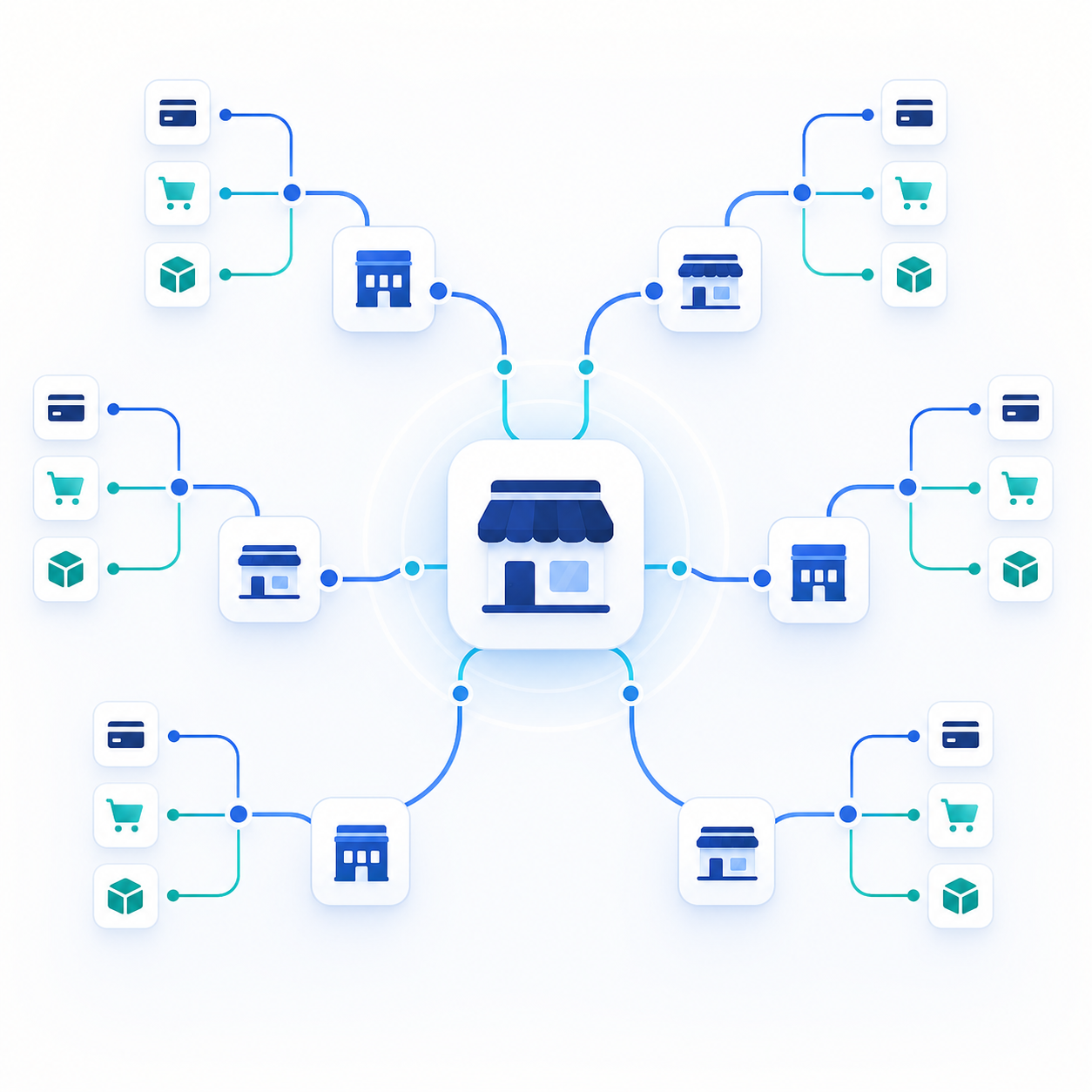
The fix is to list all locations first via the Locations API, then fan out your data queries per location using a batch sync method.
- Locations can be
ACTIVEorINACTIVE, so filter accordingly or you may pull ghost data from closed sites. - Location IDs are stable but location names are not, so key your internal records on the ID.
OAuth Scopes and Permissions for Multi-Location Merchants
Square uses a scope-based OAuth model where each resource category requires an explicit permission. For multi-location merchants, this creates a real surface area problem.
The scopes you'll commonly need:
PAYMENTS_READto read transactions across locationsORDERS_READfor order-level dataMERCHANT_PROFILE_READto identify the merchant and retrieve their account structureINVENTORY_READfor stock levels per location
The catch: scopes are granted at the merchant level, but data access is filtered at the location level underneath. A merchant can complete your OAuth flow and grant every scope you requested, yet still have individual locations invisible to your app if their account configuration restricts it. Your API calls return 200s with partial data, and nothing in the response tells you what was omitted.
Requesting the right scopes is necessary but not sufficient. You still need to verify location coverage after OAuth completes.
After the OAuth handshake, call the Locations API immediately to check what you actually have access to. Cross-reference that list against what the merchant expects you to sync. If counts don't match, surface that discrepancy early instead of letting your pipeline run quietly incomplete for weeks.
Time Zones in Square Payments: Where Timestamps Come From
Square stores all timestamps in UTC, while the timezone field lives on the Location object as separate metadata. That sounds fine until you try to aggregate sales across locations in different time zones.
The mismatch surfaces in a few concrete ways:
- Daily totals in your integration won't match what the merchant sees in their Square Dashboard, because the Dashboard converts to local time before grouping by day
- Date-range filters on the Payments API use UTC, so a query for "today" from a business's perspective will cut off or include the wrong transactions depending on their offset
- Multi-location merchants spanning time zones end up with split business days, where UTC midnight lands mid-afternoon for some locations
This is a well-documented source of confusion: terminals set to local time still record transactions with UTC-based created_at values in the API response.
The fix: store raw UTC timestamps from the API, then apply the location's timezone field at query or display time. If you build date-range filters using local business hours, offset them to UTC per location before sending the request.
| Scenario | Wrong approach | Correct approach |
|---|---|---|
| Daily sales report | Filter by local midnight in UTC | Offset local midnight to UTC per location's timezone |
| Multi-location aggregation | Sum by UTC day | Convert each transaction to location-local time, then group |
| Dashboard reconciliation | Compare raw API timestamps to Dashboard totals | Match Dashboard date grouping by applying location timezone |
The Payouts API vs. the Payments API: Different Data, Different Problems
Square payouts are batched bank transfers, not per-transaction settlements. A single payout bundles net proceeds from sales, Square fees, refunds, and other adjustments into one bank deposit. The Payouts API is a separate surface from the Payments API, with its own endpoints and pagination.
To trace which payments contributed to a given payout, you have to iterate through payout entries individually. There is no shortcut join.
The settlement timing creates a second problem. A payment captured on Tuesday may not land in a payout until Thursday. If your integration syncs payment records daily and your accounting system books revenue on capture date, that Tuesday payment appears as revenue before the corresponding payout arrives. The bank deposit lands in a different accounting period, and QuickBooks integration reconciliation breaks unless you account for the lag explicitly.
- Payments API: records the transaction at capture time
- Payouts API: records the bank transfer at settlement time, which can be one to several business days later
- Payout entries: typed line items within a payout (charges, refunds, fees, adjustments) that you list per payout
Matching Payouts Against Your Accounting System
Syncing Square into QuickBooks or Xero means matching the net bank deposit against gross sales, Square fees, and refunds. Each payout needs a journal entry that breaks out all three components, not a single line for the deposit amount.
Two places this breaks:
- Month-end boundaries: a payout spanning two calendar months splits gross revenue across periods, misaligning with Square's Dashboard totals
- Fee omission: syncing only payment totals skips Square's per-transaction processing fees, which must post as a separate expense line to balance correctly
A correct journal entry per payout batch: debit the bank account for the net deposit, debit a payment processing fee expense for Square's cut, and credit gross revenue for the full pre-fee total. This follows the same GL mapping and bank feed sync logic that trips up accounting pipelines elsewhere.
Idempotency Keys and Duplicate Payment Risk
Square requires an idempotency key on every CreatePayment request. If a network timeout occurs mid-request, reusing the same key guarantees Square returns the original result instead of processing a second charge. The Square idempotency docs are clear on this, yet duplicate charges keep appearing in developer forums because teams generate a fresh key on each retry instead of preserving the original. (Charging a customer twice is, as it turns out, not great for retention.)
The failure pattern is predictable: request times out, error handler fires, a new UUID gets generated, retry goes through, and now two payments exist for the same order. Both return COMPLETED. Nothing in the API response flags the duplicate.
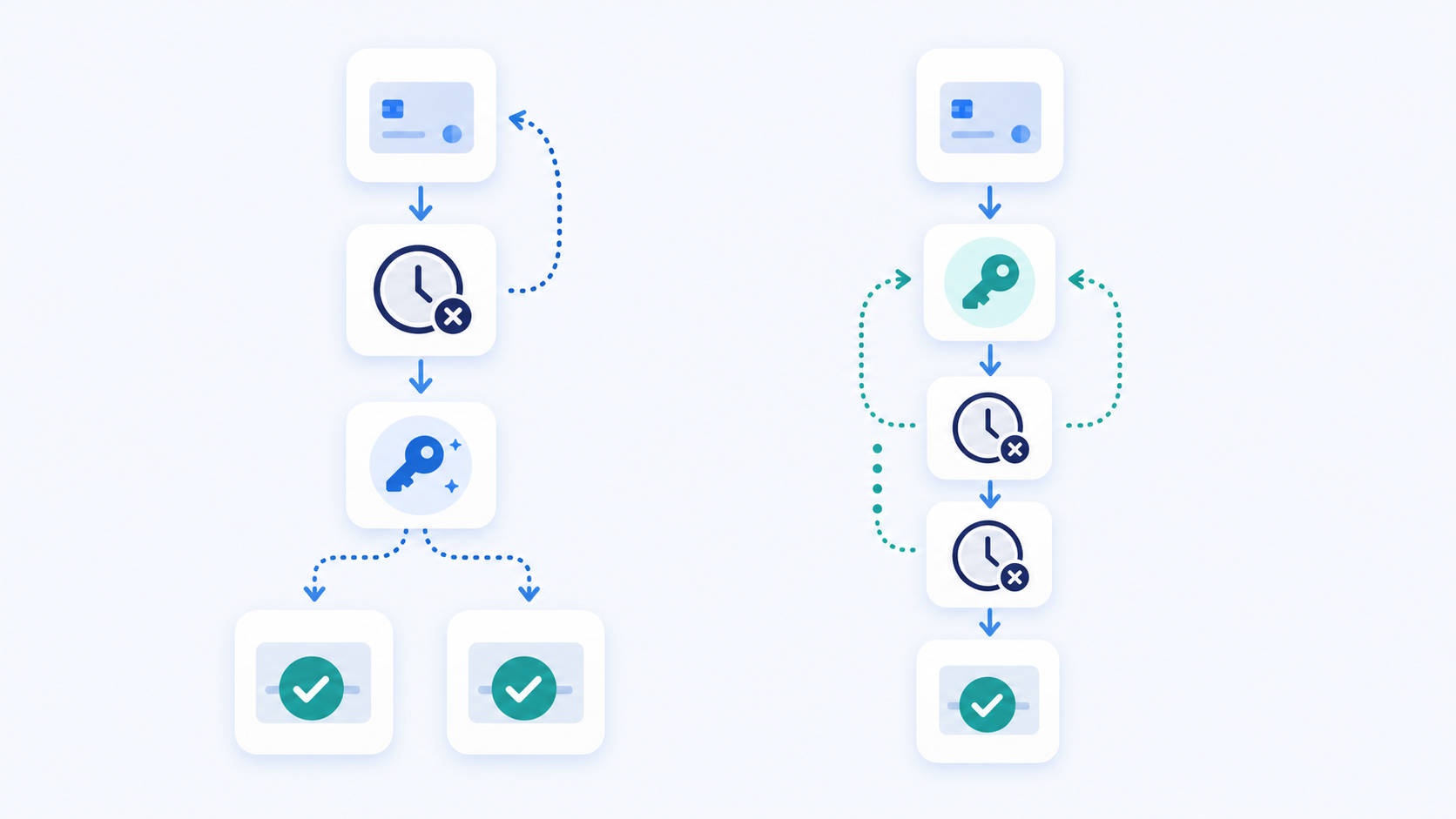
A few rules that prevent this:
- Generate the idempotency key before the request, not inside the retry loop, so the same key is available regardless of how many retries follow.
- Persist the key alongside the order record so any retry path can retrieve it without regenerating.
- If you have lost the original key, check your downstream system for an existing payment before retrying.
Key expiration is worth knowing too. Square retains idempotency keys for a limited window, after which a reused key is treated as a new request. Retries happening days later get no duplicate protection.
Catalog and Inventory Sync Across Locations
Square's Catalog API holds item definitions centrally, but stock quantities live in a separate Inventory API scoped per location. They're independent endpoints, and syncing one without the other produces a predictable problem: your product catalog looks complete, but inventory counts are either missing or zeroed out at the location level.
Sync order matters here. Pulling catalog items and inventory in parallel risks writing item records before their corresponding inventory counts have landed, leaving products with null quantities that your downstream system may read as out-of-stock.
A few structural rules that help:
- Sync the Catalog API first to create item records, then query the Inventory API per location using the resulting item IDs
- Use
catalog_object_idas the join key between catalog items and inventory counts - Filter inventory requests to
ACTIVElocations only, or you'll pull phantom stock from closed sites
Incremental syncs add another wrinkle. The Inventory API supports updated_after filtering, but catalog changes and inventory adjustments have independent timestamps. An item price update won't trigger an inventory update, and a stock adjustment won't update the catalog object. You need separate change-detection logic for each endpoint.
Handling Refunds, Disputes, and Adjustments in Your Integration
Refunds and disputes in Square don't reverse the original payment record. It's a different flavor of the deletion detection problem accounting teams face elsewhere. They create separate entries that reduce a future payout, which means your accounting system will see the original charge land in one payout and the refund deduction surface in a completely different one, potentially days later.
There are three event types worth modeling independently:
- Refunds (a refund object reaching
COMPLETEDstatus): reduce a future payout via a negative payout entry, with no modification to the original payment record. - Disputes (the
dispute.state.updatedevent): withhold the disputed amount until resolved, then either restore or deduct it depending on outcome. - Balance adjustments: Square fee corrections or other account-level line items with no corresponding payment ID, making them easy to miss.
If you're only syncing payment and payout totals, adjustments silently accumulate as open discrepancies in your books. The math drifts a little each week until someone runs a month-end close and nothing balances.
Subscribe to Square webhooks for refund.updated and dispute.state.updated instead of relying on polling alone. Polling the Payments API won't surface disputes at all, since dispute records live on a separate endpoint. Webhook delivery gives you near-real-time signal when either event occurs, so your integration can write the adjustment entry promptly instead of letting it age into a reconciliation problem.
Webhook Reliability and Sync Architecture Decisions
Square webhooks cover most of what you need: payments, orders, refunds, inventory changes. The problem is they're not guaranteed to arrive, and Square's webhook docs are straightforward about this. Network failures, timeouts, and transient errors on your receiving end all create gaps.
A purely webhook-driven architecture means any missed event produces silent data loss. A purely polling architecture means you're hammering the Payments and Orders APIs on a schedule, burning through rate limits, and introducing sync lag. Neither alone is sufficient.
The workable pattern is a hybrid: webhooks as the fast path for real-time updates, scheduled polling as the recovery mechanism. Run a periodic job that queries the Payments API with updated_after set to your last successful sync timestamp. Any records the webhooks missed will surface there.
The catch with this setup is double-processing. A payment arrives via webhook, your handler writes it, then the next polling job picks up the same record and tries to write it again. Your handler needs to check for existence before inserting, keying on Square's payment_id. Write that deduplication logic before you go to production, not after you've accumulated duplicate records in your accounting system.
A few structural rules to follow:
- Make every webhook handler idempotent from the start, so replayed events never corrupt your data.
- Store the Square event ID on ingestion so you can skip exact duplicates without a full record lookup.
- Use
updated_afteron polling jobs, notcreated_after, to catch records that changed without triggering a webhook. - Set your polling window to overlap slightly with the previous run to avoid edge-case gaps around job boundaries.
How hotglue Handles Square Integration at Scale
Every gotcha covered above lands on the engineering team shipping your Square integration, and as a CPO or Head of Partnerships, you're the one who feels it when a new merchant onboards and the scope quietly doubles. Multi-location scoping, time zone normalization, payout lag, idempotency handling: none of these are solved once. They get solved per tenant, per deployment, by the integrations engineer you assigned to this. That's the person who gets paged at 11pm when a merchant's payout reconciliation breaks, and the architecture decisions in this post determine whether that call happens at all.
hotglue gives you the building blocks to handle this without rebuilding your sync for every merchant. Per-job filter overrides passed directly in the POST /jobs call let you scope which data gets fetched on a given run, without touching global connector configuration. When a tenant adds a new Square location, you adjust the job filter, not the connector.
The guaranteed sync model means a partial failure never silently succeeds: the job either delivers all data or fails and preserves state for retry. Across 38,000+ active tenants processing roughly 10 billion records weekly, silent partial syncs are not acceptable.
For teams syncing Square data into accounting targets like the QuickBooks connector or Xero, hotglue can generate a reconciliation file surfacing differences between the two connected systems. When payout amounts don't match expected totals, finance teams get an audit trail instead of a guessing game. It's the same philosophy behind how we integrate QuickBooks with your SaaS product.
Final thoughts on Getting Multi-Location Square Data Syncs Right
Building a Square integration that actually holds up means treating each API domain as its own data pipeline, with its own failure modes. Time zone offsets, payout lag, idempotency edge cases, and per-location scoping are not edge cases you can defer. They show up reliably in production, and they show up at the worst times. Book a demo to see how hotglue helps you ship and maintain integrations like this across your tenants.
FAQ
How do you sync Square payments across multiple locations without silently missing transactions?
Query the Locations API first to get all active location_id values, then fan out your Payments API requests per location. If you skip this step, Square defaults to the main location and returns a 200 with no error, so your sync looks healthy while every other location's transactions go unrecorded.
Why don't my Square payout amounts match what's in QuickBooks or Xero?
Square payouts are batched net deposits that bundle gross sales, processing fees, and refunds into a single bank transfer, and they don't map 1:1 to individual payment records. Each payout needs a journal entry that separates all three components, and because settlement lags behind capture, payments and their corresponding deposits often land in different accounting periods.
How do I handle Square time zone errors when building a multi-location payments integration?
Store raw UTC timestamps from the Square API, then apply each location's timezone field at query or display time. Date-range filters on the Payments API run on UTC, so a query scoped to "today" from the merchant's perspective will cut off transactions incorrectly unless you offset local business hours to UTC per location before sending the request.
Can I build a Square multi-location data sync that handles payout reconciliation without polling every endpoint on a schedule?
Yes, but a pure webhook approach leaves gaps since Square webhooks aren't guaranteed to arrive. The workable pattern is webhooks as the fast path for real-time updates, with a scheduled polling job using updated_after as the recovery mechanism. Every handler also needs idempotency logic keyed on Square's payment_id to avoid writing duplicate records when both paths pick up the same event.
How does hotglue handle partial sync failures and per-location scoping for Square data?
Hotglue's guaranteed sync model means a partial failure never silently succeeds: the job either delivers all data or fails and preserves state for retry. Per-job filter overrides passed in the POST /jobs call let you scope exactly which location's data gets fetched on a given run, so adding a new Square location means adjusting a job filter, not rebuilding connector configuration across all tenants.