The QuickBooks Online API has changed more in the past year than it had in the previous five, including a new metered pricing model that quietly affects every SaaS product syncing data across multiple tenants. If your team is assessing a QuickBooks integration right now, the scoping assumptions from even 18 months ago may not hold. Here's what the build decision actually looks like in 2026.
TLDR:
- QuickBooks holds 62% of the SMB accounting market, so if your product touches finance, the integration request is coming
- QBO and QBD are two completely different integration surfaces with different auth, transport layers, and sync constraints
- Intuit's API read operations are now metered at $300-$4,500/month after the July 2025 App Partner Program launch
- Watch for four production traps: 1-hour token expiry, 100-day refresh token lapse, sandbox plan gating gaps, and realm ID assumptions
- hotglue handles both QBO and Desktop, managing token refresh, rate limits, and connector updates so your team doesn't have to
Why QuickBooks Integration Matters for B2B SaaS Products
QuickBooks holds over 62% of the SMB accounting software market, with more than 96,000 companies worldwide using it as of 2026. If your product touches invoicing, payroll, expense management, or procurement, your customers are almost certainly running QuickBooks. The integration request is coming.
For B2B SaaS teams, that request usually arrives attached to a sales deal or a churning customer, rarely at a convenient moment. Saying "we don't support QuickBooks" is increasingly a conversation-ender, especially in verticals like e-commerce, construction, nonprofit, and spend management where financial data flows constantly between tools.
QuickBooks Online vs. QuickBooks Desktop: Two Very Different Integration Surfaces
Most developers search "QuickBooks integration" as if it's one thing. It's two very different animals, and picking the wrong approach early costs you weeks.
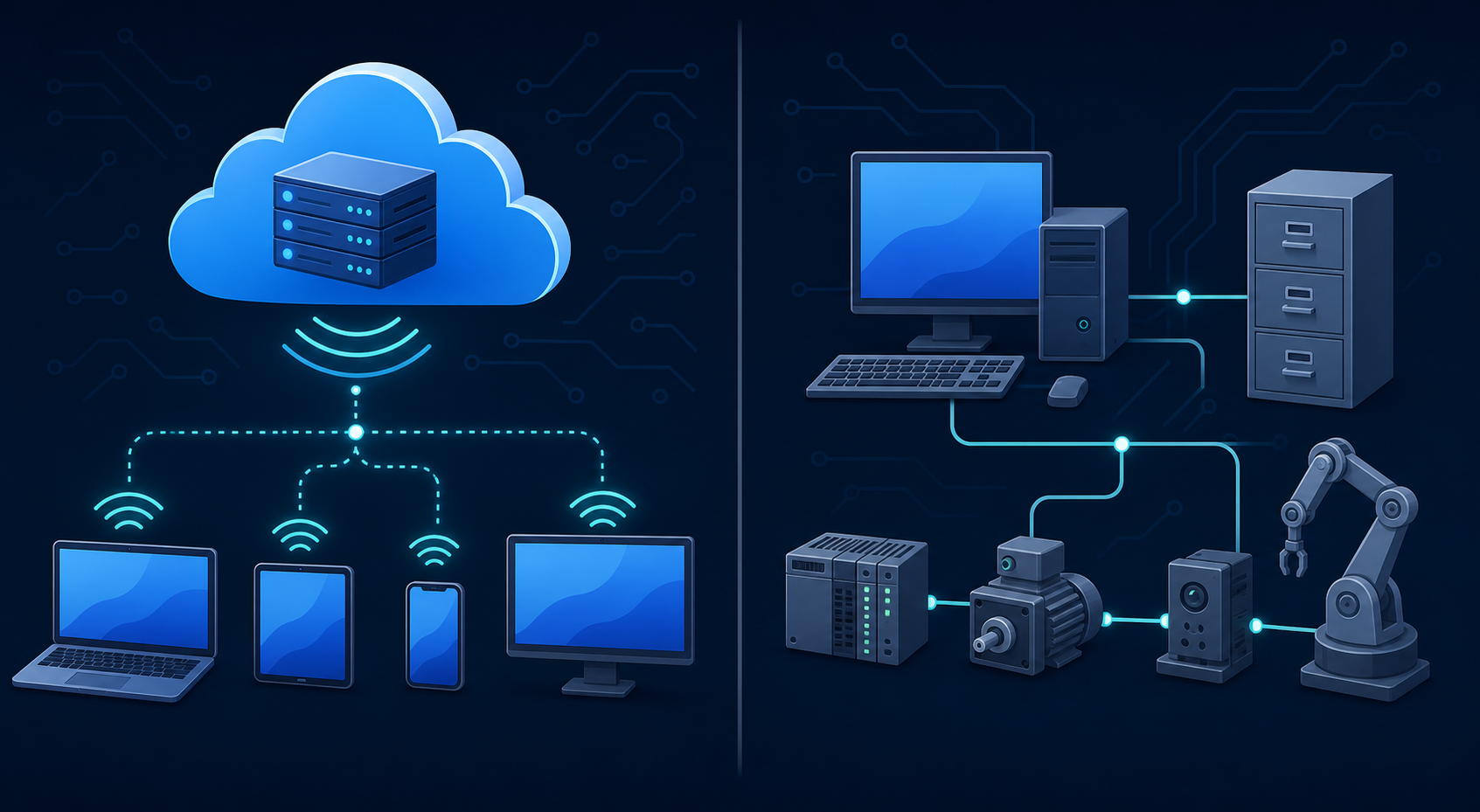
QuickBooks Online (QBO) is cloud-based and exposes a REST API with OAuth 2.0. Your app calls Intuit's hosted endpoints, tokens refresh on a standard flow, and the whole thing runs from your server. QuickBooks Desktop (QBD), by contrast, runs locally on a Windows machine with no REST API. You're working with one of four integration methods:
- The Desktop SDK, for custom integrations with full control over the data layer
- The QuickBooks Web Connector, for scheduled data sync over SOAP
- An ODBC driver, suited mostly for read-only reporting
- Third-party middleware, which abstracts the transport layer entirely
The gap between QBO and QBD is substantial. QBO auth happens in a browser; QBD auth is tied to the local company file and the Windows machine state. QBO can sync on demand from anywhere; QBD syncs only when QuickBooks is open and the Web Connector is running. If your customer closes their laptop mid-sync, that's your problem to handle.
A SaaS team that scoped a QBO integration and then found their biggest customer runs QuickBooks Enterprise on-premise has a painful conversation ahead, usually right before a sprint planning meeting. Know which surface you're targeting before writing a line of code.
How the QuickBooks Online API Works
The QBO API is REST-based with OAuth 2.0 authentication. You register your app in the Intuit Developer Portal, get client credentials, and redirect users through Intuit's consent screen. On completion, you receive an access token and a refresh token. The access token expires after one hour, so token refresh logic is required in every production implementation. The refresh token lasts 100 days, but if it expires before your app refreshes it, your customer has to re-authenticate manually.
Each connected company has a unique realm ID that scopes every API call, so your data model needs to track which realm ID belongs to which customer from day one.
The entity model maps closely to standard accounting objects:
- Customers, vendors, and employees
- Invoices, bills, and payments
- Accounts (your chart of accounts)
- Items (products and services)
- Journal entries and purchase orders
Queries use a SQL-like syntax called IDS Query Language. You can filter, paginate, and sort, but complex joins across entities require multiple calls, which compounds quickly against rate limits.
QuickBooks API Rate Limits and the New Pricing Model
Intuit's QuickBooks API was free to read from for years. That changed on July 28, 2025, when the App Partner Program went live, introducing metered pricing for data-read operations.

Write operations (creating invoices, updating vendors, posting bills) remain unmetered. But read operations, which Intuit classifies as "CorePlus," are now strictly metered. The free Builder tier gives you 500,000 read operations per month before requests get blocked. Paid tiers run from $300/month to $4,500/month, with overage fees on top.
For a SaaS product syncing data across hundreds of tenants, 500,000 reads disappears faster than you'd expect. Historical backfills, incremental syncs, and report fetches all consume CorePlus quota. Combined with hard rate limits of 500 requests per minute per realm ID, 10 concurrent requests per second, and a 30-operation maximum per batch request, production sync logic gets complicated fast.
The practical implication: budget API costs per tenant, not per app. A product with 200 active QuickBooks customers syncing nightly has a very different cost profile than one with 20.
The Hidden Complexity of QuickBooks Desktop Integration
QuickBooks Desktop has no REST API. Where QBO gives you clean OAuth and JSON responses, Desktop hands you qbXML over SOAP, a Windows-only Web Connector, and a company file that must be open for any sync to run.
The integration stack looks roughly like this:
- Your app sends requests via SOAP callbacks through the Desktop SDK
- The Web Connector, installed locally on the customer's Windows machine, brokers the communication
- QuickBooks Desktop must be running and the correct company file must be open
- If the machine is off, the file is closed, or the Web Connector version mismatches, the sync fails
That last point is where the real support burden lives. Cloud SaaS teams are used to their infrastructure being their problem. With QuickBooks Desktop, the customer's Windows environment becomes part of your stack, turning Web Connector versioning and company file state into support tickets every time a customer's IT team updates something locally.
Teams that budget for "a QuickBooks integration" scoped against QBO documentation and then find out their largest customer runs QuickBooks Enterprise on-premise are looking at a substantially different project.
Key Integration Categories and What Each One Syncs
The entities that move between systems vary more than most teams expect. A Shopify to QuickBooks integration covers orders, line items, SKUs, refund events, and inventory adjustments, each needing to map correctly to QuickBooks items and accounts. Miss the inventory adjustment stream and your customer's books drift from their warehouse within days.
| Integration Category | Systems | Data That Moves |
|---|---|---|
| E-commerce | Shopify, Amazon, TikTok Shop | Orders, SKUs, inventory adjustments, refunds, sales tax |
| CRM | Salesforce, HubSpot | Customers, contacts, invoices, payment status |
| Payroll & HR | Gusto, ADP, Paylocity | Journal entries, wage data, tax withholdings |
| Payments | Stripe, Airwallex | Transactions, fees, reconciliation records |
| AP Automation | Tipalti, Airwallex | Bills, payees, approvals, GL account mapping |
CRM integrations like Salesforce or HubSpot to QuickBooks typically sync in the opposite direction: a closed deal in the CRM triggers an invoice in QuickBooks, with customer records kept in sync across both systems. The tricky part is deduplication, since the same customer often exists slightly differently in each system, and a naive sync creates duplicates.
Payroll integrations are narrower but more sensitive. Systems like Paylocity or ADP push journal entries and wage summaries into QuickBooks, not raw payroll records. Getting the GL account mapping right matters here; a mismatch posts payroll costs to the wrong account and creates a reconciliation headache at month-end.
Benefits of QuickBooks Integration for SaaS Products
For most SMB buyers, QuickBooks is the financial system of record. Every invoice, payment, and journal entry runs through it. When your SaaS product forces them to export CSVs and import data into QuickBooks manually, that friction accumulates fast and eventually becomes a reason to churn.
Native QuickBooks integration removes that manual layer entirely. Customers stay longer because their data is already in sync with their books, sales cycles shorten when procurement stops blocking deals over missing accounting connectivity, and support volume drops when finance teams stop filing tickets about mismatched records.
The internal business case usually comes down to three things:
- Retention: integration gaps are a leading churn driver in verticals where financial accuracy is non-negotiable
- Revenue: deals that stall on "does it connect to QuickBooks?" close faster once the answer is yes
- Accuracy: automated sync cuts reconciliation errors that manual data entry introduces every week
Once QuickBooks is connected, customers build workflows around it, making your product stickier with every passing month.
Building vs. Embedding a QuickBooks Integration
Building a QuickBooks integration in-house is absolutely possible. Engineering teams do it regularly. The harder question is what ownership looks like in month 18, not week one.
The initial build covers the happy path: OAuth flow, a handful of entities, scheduled syncs, basic error handling. What follows is a longer list:
- Token refresh edge cases when a customer's refresh token silently expires after 100 days
- Rate limit backoff logic when 500 requests per minute per realm ID isn't enough headroom during a historical backfill
- API endpoint deprecations when Intuit ships changes to the App Partner Program or retires older QBO endpoints
- Schema drift when a customer's QuickBooks chart of accounts doesn't match your expected field mapping
- Web Connector version mismatches for any customer still on Desktop
- Per-customer QuickBooks plan differences (Essentials vs. Plus vs. Advanced expose different entities), and teams migrating to Microsoft Dynamics Business Central face an entirely different connector scope
Each of those is a support ticket or an engineering sprint. Over a two-year horizon, that maintenance load compounds against your core product roadmap, which, as any CPO knows, is already optimistically scoped.
Embedding an integration layer moves that burden off your plate. Instead of owning the connector, your team owns the data model and transformation logic, which is the part that actually varies per customer. Rate limit management, token refresh, API monitoring, and connector rebuilds when Intuit deprecates endpoints become someone else's problem.
The build-vs-embed decision usually comes down to one question: is QuickBooks integration a core competency your team wants to develop, or a dependency you want maintained while you build something else?
What to Watch for When Building a QuickBooks Integration
Four specific traps show up repeatedly in production QuickBooks integrations:
- Access tokens expire after one hour, so if your sync runs longer than that, mid-job token expiry causes silent failures unless you build refresh logic into the sync loop itself, and at session start.
- Refresh tokens last 100 days but expire if unused, meaning a customer who goes quiet for three months comes back to a broken connection that requires manual re-auth.
- Sandbox doesn't mirror production plan gating, so entities available in your test company may be locked behind QuickBooks Plus or Advanced in production, breaking flows that passed QA cleanly.
- Multi-company support requires tracking realm IDs per customer, per company file. Teams that assume one customer equals one realm ID tend to hit this in month two when an accountant connects a second entity.
The QBO API also doesn't guarantee idempotent writes natively, so a retry after a failed sync can create duplicate invoices or vendors without careful deduplication logic on your end.
How hotglue Handles QuickBooks Integration for B2B SaaS Teams
hotglue's QuickBooks connector supports both QuickBooks Online and QuickBooks Desktop, including multi-user Desktop environments via the Windows agent and Web Connector that cloud-only approaches can't reach. Token refresh, rate limit backoff, API monitoring, connector rebuilds when Intuit deprecates endpoints: all of it is handled by our integrations team, not yours.
A few specifics worth knowing:
- hotglue manages API rate limiting on your behalf, so you're not engineering around Intuit's 500 requests-per-minute ceiling yourself
- Cron-based scheduling is configurable per connector, so QuickBooks can sync nightly while Salesforce runs hourly in the same deployment
- Our integrations team actively monitors Intuit's API changes and migrates connectors to new endpoints before they break in production
- Python-powered transformation lets you control exactly how data lands in your system, including multi-field deduplication to prevent the duplicate customer records that naive QuickBooks syncs create
- Pricing is tenant-based, not volume-based, so your cost scales predictably as customers connect instead of spiking with read operation counts
hotglue processes approximately 10 billion records weekly across 38,000+ active tenants. A partial sync failure never silently succeeds: the job either delivers all data or fails and preserves state for retry, which matters when your customer's month-end close depends on it.
For product teams already running some in-house integrations, the entry point is usually the connector you can't staff: the Desktop customer, the edge-case entity, the connector that's been on the backlog for two quarters. That's where hotglue fits without replacing what your team already owns.
Final Thoughts on QuickBooks Integration Complexity and How to Manage It
The technical surface here is bigger than most teams expect, and the ongoing maintenance is where the real cost hides. Knowing that before you start gives your team a much better shot at scoping it accurately. Book a demo if you want to see how other B2B SaaS teams have structured their QuickBooks integration without it taking over the roadmap.
FAQ
Should I build a QuickBooks integration in-house or use an embedded integration layer like Hotglue?
Build in-house if QuickBooks integration is a core competency your team wants to own long-term. If it's a dependency you want maintained while you ship product, embedding makes more sense. The hidden cost of in-house ownership isn't the initial build; it's the 18-month tail of token refresh edge cases, rate limit backoff logic, Intuit endpoint deprecations, and Web Connector version mismatches that pull engineering cycles away from your roadmap.
What's the difference between QuickBooks Online and QuickBooks Desktop integration?
QuickBooks Online gives you a REST API with OAuth 2.0: clean, cloud-based, and callable from anywhere. QuickBooks Desktop has no REST API; syncs run over SOAP through the Web Connector, require the desktop app to be open on a Windows machine, and break if the customer's IT team updates something locally. Teams that scope a project against QBO documentation and then find out their largest customer runs QuickBooks Enterprise on-premise are looking at a substantially different build.
How does the QuickBooks API pricing model work for a SaaS product with many tenants?
Write operations stay unmetered, but read operations ("CorePlus") have been metered since July 2025. The free Builder tier gives you 500,000 read operations per month across all tenants before requests are blocked. Paid tiers run from $300 to $4,500 per month with overage on top. For a product syncing data across hundreds of active QuickBooks customers, that quota disappears fast once you factor in historical backfills and nightly incremental syncs. Budget API costs per tenant, not per app.
What apps that integrate with QuickBooks Online tend to miss in production?
The most common gaps are sandbox-to-production plan mismatches (entities available in your test company may be locked behind QuickBooks Plus or Advanced in production), refresh tokens silently expiring after 100 days of inactivity, and multi-company realm ID tracking. Teams that assume one customer equals one realm ID tend to hit that assumption hard in month two when an accountant connects a second entity.
What's the fastest way for a B2B SaaS team to ship a production-ready QuickBooks integration in 2026?
The fastest path is using an embedded integration layer that already handles token refresh, rate limit management, API monitoring, and both QBO and QuickBooks Desktop surfaces out of the box. Building the happy path yourself takes days; owning the edge cases takes quarters. Hotglue supports both Online and Desktop, including multi-user Desktop environments via the Windows agent and Web Connector, with tenant-based pricing that scales predictably as customers connect instead of spiking with read operation volume.