ERP integrations have a way of exposing exactly where abstraction breaks down. A unified API is a great idea right up until your customer's Sage 300 CRE cost codes or Dynamics 365 custom dimensions have nowhere to go in a fixed schema. If you're comparing Merge against alternatives for complex ERP use cases, the architectural difference between a unified API and an embedded iPaaS like Hotglue is worth understanding before you commit.
TL;DR: Merge's fixed common data model drops custom ERP fields and skips on-prem systems entirely — Hotglue's embedded iPaaS handles both with per-tenant Python transformations, open-source connectors, and a support model built around your team's actual deadlines.
What Is Merge?
Merge is a unified API that normalizes third-party APIs across HR, ATS, CRM, and accounting into a single standardized endpoint, so engineering teams write integration logic once instead of once per tool.
What Is Hotglue?
Hotglue builds embedded integration infrastructure for B2B SaaS teams. Your customers connect their tools (QuickBooks, NetSuite, Salesforce, Shopify) directly inside your product, and Hotglue handles the connectors, syncs, and maintenance underneath.
Pricing is per active tenant, so you pay based on real usage, not seat counts or connector tiers. Every connector is also open-source, which means your engineering team can inspect, fork, and extend them without waiting on a vendor roadmap.
| Merge | Hotglue | |
|---|---|---|
| Architecture | Unified API with fixed common data model | Embedded iPaaS with per-tenant transformation layer |
| Custom ERP fields | Dropped if they don't map to the fixed schema | Preserved via per-tenant Python transformation scripts |
| On-prem ERP support | Not supported | QuickBooks Desktop, Sage 300 CRE, Sage 200 UK |
| Connector transparency | Closed / black-box abstraction | Open-source, Singer spec / Airbyte YAML compatible |
| Pricing model | Per linked account (billed even if inactive) | Per active tenant in last 30 days; one tenant regardless of connector count |
| Support model | Self-serve; ticket-based for edge cases | Dedicated Slack channel; new connectors in 1 to 2 weeks |
| Best for | Standard HRIS, ATS, and CRM integrations | Complex ERP integrations with custom fields and on-prem installs |
How Each Approach Handles ERP Data Models
Merge's core promise is convenience: one schema, one endpoint, many tools. For straightforward HRIS or ATS data, that works well. ERP is a different story.

Systems like NetSuite, QuickBooks Desktop, Sage 300 CRE, and Microsoft Dynamics 365 are built around custom fields, company-specific chart-of-accounts structures, and per-tenant schema variations that differ meaningfully across customers. When you push that data through a rigid normalized model, fields that don't map cleanly get dropped. As one analysis of Merge's limitations puts it, the common data model "drops custom fields" and this starts to bite once you sell to enterprise buyers.
Hotglue exposes provider-specific data directly. Your transformation layer, written in Python, shapes the data for your product's needs, field by field, tenant by tenant. A construction SaaS syncing Sage 300 CRE cost codes gets those cost codes. A finance tool pulling Dynamics 365 Finance custom dimensions keeps them intact. Nothing gets silently flattened.
For ERP integrations, that architectural difference is the whole game.
Connector Depth and On-Prem Support
Merge's accounting category covers the basics well enough for standard read/write against cloud ERPs. The issue is that everything runs through its common data model, so you never get direct visibility into what the connector is actually doing or how it handles edge cases per provider.
On-prem ERP is where that abstraction collapses. Most embedded integration tools skip Dynamics on-premise entirely because it's messy, requires local installation, and doesn't fit cleanly into cloud-first architectures. Hotglue takes the opposite approach:
- QuickBooks Desktop: supported via a Windows agent and the QuickBooks Web Connector, including multi-user environments
- Sage 300 CRE: installs directly on-premise and connects to the local database, resilient to software updates
- Sage 200 UK: supported via a cloud proxy for this widely-used on-prem UK accounting system
Cloud ERP coverage goes just as deep: NetSuite, Microsoft Dynamics Business Central, Acumatica, Sage 100, and QuickBooks Online all have field-level access without schema flattening. Every connector is open-source and Singer/Airbyte-compatible, part of a scalable integration architecture so your team can read the code, fork it, or extend it with no support ticket required.
Customization and Per-Tenant Configuration
No two customers run their ERP the same way. One NetSuite customer has custom fields tracking project cost centers; another tracks intercompany allocation codes. Merge's common data model has a fixed schema, and what falls outside it gets dropped. There's no clean workaround for a field that simply has no mapping.
Hotglue handles this at the pre-processing layer. Each tenant gets a Python transformation script that shapes raw connector output into whatever your product expects. Field mapping, renaming, conditional logic, and deduplication across multiple identifiers are all configurable per customer without touching another tenant's setup. GluestickAI can generate that Python logic from plain-language descriptions, reflecting a platform built for developers so your team moves faster even on unusual ERP configurations.
A few things this unlocks that Merge's model can't support cleanly:
- Multi-field record matching across identifiers like email, company name, and billing postal info simultaneously
- Reconciliation file generation showing sync discrepancies, giving customers a clear audit trail
- Custom deduplication rules scoped per tenant, not applied globally across all customers
For ERP integrations where every enterprise customer has spent years customizing their instance, that per-tenant flexibility matters more than schema convenience.
Pricing Model and Cost at Scale
Merge charges per linked account, meaning every connected customer counts against your bill regardless of whether they synced data last week or six months ago. As your customer base grows, that cost compounds fast.
Hotglue's pricing runs on a 30-day rolling active window. Tenants who haven't synced recently don't count. A customer connecting to QuickBooks, Salesforce, and Shopify simultaneously still counts as one tenant, not three. Exact figures vary by plan and connector count, so check Hotglue's pricing page for current tiers, but the model is designed to stay under 10% of your MRR, so integration costs scale with revenue and not against it.
Open-Source Connectors vs. Black-Box Abstraction
When an ERP sync goes wrong (and it will, with the reliability of a Monday morning coffee spill), the first thing your engineers ask is: what exactly did the connector do? With Merge, that answer is unavailable. The connectors are abstracted, closed, and inspectable only to the degree Merge's error messages allow. You file a ticket and wait. (Great time to catch up on your backlog, but not ideal when a customer's month-end close is in 12 hours.)
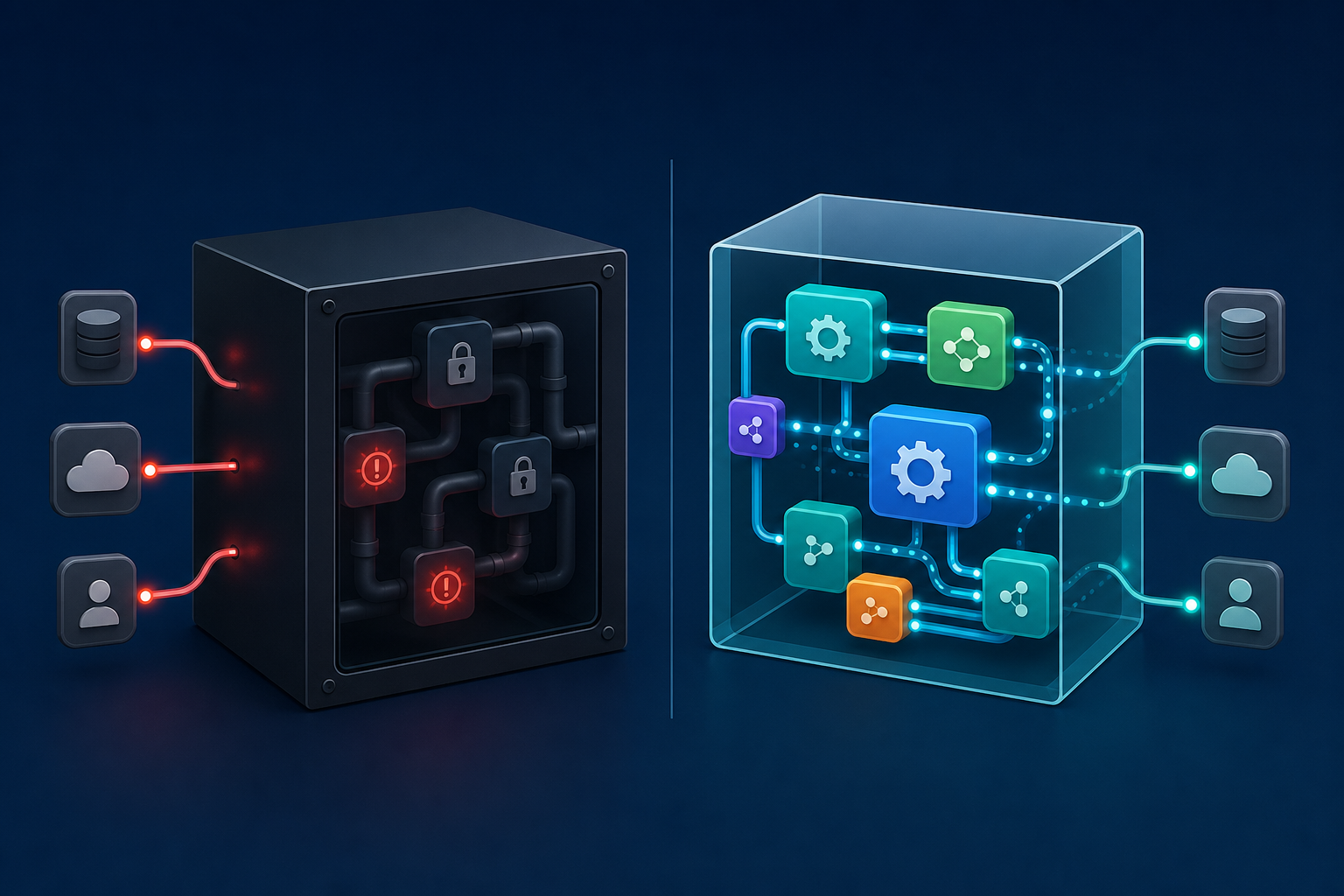
Hotglue's connectors are open-source and Singer spec / Airbyte YAML compatible. Your team can read the actual code, see how the connector handles pagination, trace exactly which fields get pulled from a NetSuite saved search, and fork the connector if your customer's ERP instance requires behavior the default doesn't cover.
For ERP integrations, this transparency is a debugging requirement. Dynamics 365 behaves differently across customer environments. Sage 300 CRE has quirks that depend on which modules a customer has licensed. When something breaks at 2am before a customer's month-end close, your engineers need source-level visibility, not an abstracted error payload from a vendor's normalized layer.
Support Model and Implementation Ownership
When an ERP integration breaks before a customer's month-end close, the last thing you want is a support ticket queue.
Merge is largely self-serve. When edge cases surface inside a rigid unified schema, your engineering team owns the investigation, within the limits of what the abstraction exposes. For standard HRIS data, that's manageable. For NetSuite or Dynamics 365 with customer-specific configurations, it gets expensive fast.
Hotglue's model works differently. Every customer gets a dedicated Slack channel with the Hotglue team directly in it. Issues get resolved in hours, not days. Regular partner syncs keep both sides ahead of problems before they become customer escalations. When a new connector is needed, Hotglue can stand it up in one to two weeks from API access. Partners handle first-line support with their own customers; Hotglue handles connector maintenance and monitors third-party API changes, migrating connectors to new endpoints automatically when vendors update their APIs.
In ERP integrations, that last part matters more than it sounds. NetSuite, Sage, and Dynamics all push API changes on their own schedules. Without active monitoring, those changes silently break syncs. With Hotglue, your engineers never find out about it because we've already handled it.
Why Hotglue Is the Better Choice for Complex ERP Integrations
Merge earns its place for horizontal categories like HR, ATS, and ticketing, where tenants run standard configurations and a normalized schema genuinely speeds things up, similar to syncing data across the top CRMs your customers already use. If you need basic employee record sync across a dozen HRIS tools, the unified model works well.
ERP is a different scope entirely. Custom fields, on-prem installs, tenant-specific chart-of-accounts structures, and month-end reliability requirements all push past what a fixed common data model can handle cleanly. If you're a CPO or Head of Partnerships at a B2B SaaS company, this decision lands squarely on your plate. Your engineering team will build whatever you spec, but they'll thank you (loudly) if the integration infrastructure doesn't require them to reverse-engineer a vendor's abstraction layer at midnight.
Hotglue is built for exactly that scope:
- Open-source connectors your team can inspect and fork, so you own the integration logic without waiting on a vendor roadmap.
- Python scripts configurable per tenant, giving you the flexibility to handle the quirks each customer's ERP setup inevitably brings.
- On-prem support for QuickBooks Desktop and Sage 300 CRE, covering the installs that most API-first tools quietly ignore.
- A hands-on team embedded in your Slack channel (not behind a ticket queue), because ERP issues rarely fit neatly into a support form.
ERP complexity is the core problem worth solving here, not an edge case to normalize away.
Final Thoughts on Embedded iPaaS vs Unified API for ERP Integrations
A unified API is a smart shortcut for predictable data models, but ERP is rarely predictable. Your customers' NetSuite instances, Sage setups, and Dynamics environments are all slightly different, and a common data model papers over that in ways that surface later as missing fields and broken syncs. Hotglue's approach keeps that complexity visible and manageable. See it in action with your own integration requirements.
FAQ
Should I choose Hotglue or Merge for ERP integrations like NetSuite or Sage 300 CRE?
If your product needs to sync with ERP systems that have custom fields, on-prem installs, or tenant-specific schema variations, Hotglue is the better fit. Merge's common data model flattens or drops fields that don't map cleanly to its fixed schema, which becomes a real problem once you're selling to enterprise buyers running customized ERP instances.
How does Hotglue handle per-tenant ERP customization differently than Merge's unified API?
Hotglue gives each tenant a Python transformation script that shapes raw connector output into whatever your product expects, so one NetSuite customer can preserve project cost centers while another keeps intercompany allocation codes, all without touching another tenant's setup. Merge applies a single fixed schema across all tenants, meaning anything outside that schema gets silently dropped with no clean workaround.
Who is Merge best suited for, and when should I consider Hotglue instead?
Merge works well for horizontal categories like HRIS and ATS where tenants run standard configurations and a normalized schema speeds up development. Hotglue is the better choice when your customers run QuickBooks Desktop, Sage 300 CRE, Dynamics 365, or any ERP with custom fields, on-prem installs, or month-end reliability requirements that a fixed common data model can't handle without data loss.
Can Hotglue support on-premise ERP systems that Merge doesn't cover?
Yes. Hotglue supports QuickBooks Desktop via a Windows agent, Sage 300 CRE via a direct on-prem database connection, and Sage 200 UK via a cloud proxy. Most embedded integration tools skip on-prem entirely because local installation doesn't fit cloud-first architectures; Hotglue treats it as a core capability, which matters a great deal for customers in construction, real estate, and nonprofit verticals where legacy software still dominates.
What happens when an ERP sync breaks and my team needs to debug it fast?
With Merge, the connectors are closed and you're limited to whatever error messages the abstraction layer surfaces. Your team files a ticket and waits. Hotglue's connectors are fully open-source and Singer spec / Airbyte YAML compatible, so your engineers can read the actual connector code, trace exactly which fields are being pulled, and fork the connector if a customer's ERP instance needs behavior the default doesn't cover. Every Hotglue customer also gets a dedicated Slack channel with the Hotglue team directly in it, so ERP issues before a month-end close get resolved in hours, not days.