Your internal data team and your product team probably need completely different integration tools, and buying the wrong one for either group is an expensive mistake to unwind. With the data integration market sitting at over $14 billion, vendors are everywhere and the differences between them aren't always obvious. This guide walks through the categories, the pricing traps, and the questions worth asking before you commit.
TLDR:
- Internal ETL tools and embedded iPaaS solve different problems; picking the wrong category means rebuilding later
- IT teams spend 39% of their time building custom integrations, so buying beats building when requests are recurring
- Volume-based pricing can spike your bill fast; tenant-based pricing scales with revenue, not data volume
- MCP has hit 28% adoption among Fortune 500 companies, making real-time AI data access a buyer requirement now
- hotglue handles customer-facing integrations with tenant-scoped MCP access, open-source connectors, and SOC 2 Type II compliance
What Is Data Integration Software?
Data integration software connects disparate systems so data can move between them reliably, without anyone manually exporting CSVs or writing one-off API scripts.
At its core, it extracts data from a source system, optionally reshapes it into a usable format, and loads it somewhere else. That destination might be a data warehouse, another SaaS product, or your own application's backend. The goal is a consistent, trustworthy view of data across every system a business runs.
For B2B SaaS teams, this problem shows up in two distinct ways. Internal teams need their CRM, billing, and finance tools talking to each other. But product teams also need their customers to connect their own tools, like QuickBooks, Salesforce, or Shopify, directly inside the product. Those are very different problems, and not every data integration tool solves both.
The data integration market sits at $14.33B and is projected to reach $22.17 billion by 2031. That growth reflects a simple reality: companies run more software than ever, and keeping data in sync has become a core product requirement.
Types of Data Integration Software
Not every integration tool is built for the same job. Picking the wrong category wastes months, so here's how to get your bearings.
| Type | What it does | Best for | Limitation |
|---|---|---|---|
| ETL | Extracts, converts, then loads | Structured warehouse pipelines | Slower; the conversion step adds latency |
| ELT | Extracts, loads raw, converts later | Cloud warehouses (Snowflake, BigQuery) | Requires downstream dbt or SQL work |
| Reverse ETL | Pushes warehouse data back to SaaS tools | Syncing analytics into CRM or marketing tools | Warehouse-dependent; not customer-facing |
| Real-time / streaming | Moves data as events happen | CDC, fraud detection, live dashboards | Higher infra complexity and cost |
| Embedded iPaaS | Customer-facing integrations inside your product | B2B SaaS letting users connect their own tools | Overkill for pure internal analytics |
| Unified API | One abstracted endpoint across many similar systems | Standardized HRIS or CRM reads | Hides connector-level detail; limited write support |
| Workflow automation | Trigger-based task automation (Zapier-style) | Simple if-this-then-that flows | Stateless; struggles with bulk or historical data |
The category that trips up most B2B SaaS product teams is confusing an internal ETL tool with an embedded iPaaS. If your customers need to connect their QuickBooks or Salesforce accounts inside your product, a warehouse-centric ETL tool won't get you there.
How Data Integration Software Works
Most tools follow the same sequence: a connector authenticates with a source system, pulls data via API or database query, a scalable integration architecture reshapes that data into the format your backend expects, and a scheduler or webhook trigger determines when the process runs.
Field mapping is where things get complex. Raw data from QuickBooks uses different field names than your product's schema, so the integration layer has to resolve those differences before delivery. Auth handling, OAuth flows, token refresh, and API rate limiting all run underneath, invisible to the end user but worth understanding as a buyer.
What buyers consistently underestimate is ongoing maintenance. APIs change endpoints, vendors deprecate fields, and schemas drift. A sync that worked in January can start dropping records in March with no warning — which is a fun surprise no one puts on the roadmap. (Right up there with "the connector worked fine in staging.")
Key Features to Assess in Any Data Integration Tool
When comparing tools, these are the factors worth pressure-testing before you sign anything:
- Connector breadth and depth: how many connectors exist, and do they cover edge cases like on-premise systems or legacy ERPs?
- Pre-processing layer: can you write code when no-code falls short, or are you locked into a visual builder?
- Sync scheduling: flexible cron-based scheduling per connector, plus on-demand triggers when customers need a manual refresh
- Error handling: does a partial failure silently succeed, or does the tool fail loudly and preserve state for retry?
- Security and compliance: SOC 2 Type II and GDPR are table stakes; confirm whether the tool stores customer data or just processes and delivers it
- Pricing structure: per-row, per-connector, per-tenant, or usage-based all behave very differently at scale
- Support model: a ticketing queue is not the same as a dedicated team that knows your integration stack
The support question gets skipped most often in evaluations, and it's the one that matters most when something breaks at 2am before a customer demo.
Data Integration Pricing Models: What to Watch Out For
Pricing is where integration tools hide their surprises. The iPaaS market hit $8.5B in 2025, and as competition intensifies, vendors are getting creative with how they structure costs.
The four models you'll encounter:
- Volume-based (per row/record): cheap at low data volumes, but costs scale fast as customer usage grows
- Task-based: charges per automation step, so bulk syncs get expensive quickly
- Connector-based: flat fee per integration regardless of usage; predictable, but penalizes breadth
- Tenant-based pricing: charges per connected end customer, so costs scale with your revenue and not your data volume
Volume-based pricing deserves the closest scrutiny. A customer who syncs five years of QuickBooks history on day one can spike your bill before you've earned a dollar from them.
The Build vs. Buy Decision for B2B SaaS Teams
Building integrations in-house feels like the safe choice until the third API endpoint change of the year hits your sprint. According to a Salesforce/MuleSoft benchmark of over 1,050 IT leaders, IT teams already spend 39% of their time building custom integrations. That's before accounting for schema drift, token refresh bugs, and the connector rebuild that follows every time a vendor updates their API.
The hidden costs stack fast:
- API maintenance as third-party vendors deprecate endpoints or shift authentication requirements
- Schema drift when source systems add, rename, or remove fields without warning
- Connector rebuilds when a single customer variant requires a net-new integration path
- Engineering bandwidth diverted away from core product work
Buying makes more sense when integrations are recurring customer requests, not one-offs. If your roadmap includes ten connectors this year and two engineers, the math rarely favors building.
Customer-Facing vs. Internal Data Integration
Internal integration and customer-facing integration are genuinely different problems, and most tool comparisons treat them as the same one. This distinction usually lands on the desk of a CPO or Head of Partnerships: the person who gets the feature request from ten customers in the same week and has to figure out whether engineering should build it or someone else should own it. They're also the ones who end up managing the vendor relationship, tracking connector coverage, and explaining to the CEO why the Salesforce sync is still broken.
Internal integration connects systems your company owns: pulling CRM data into a warehouse, syncing billing records to a BI dashboard, or pushing ops data between internal tools. One team, one tenant, one set of credentials. The requirements are relatively contained.
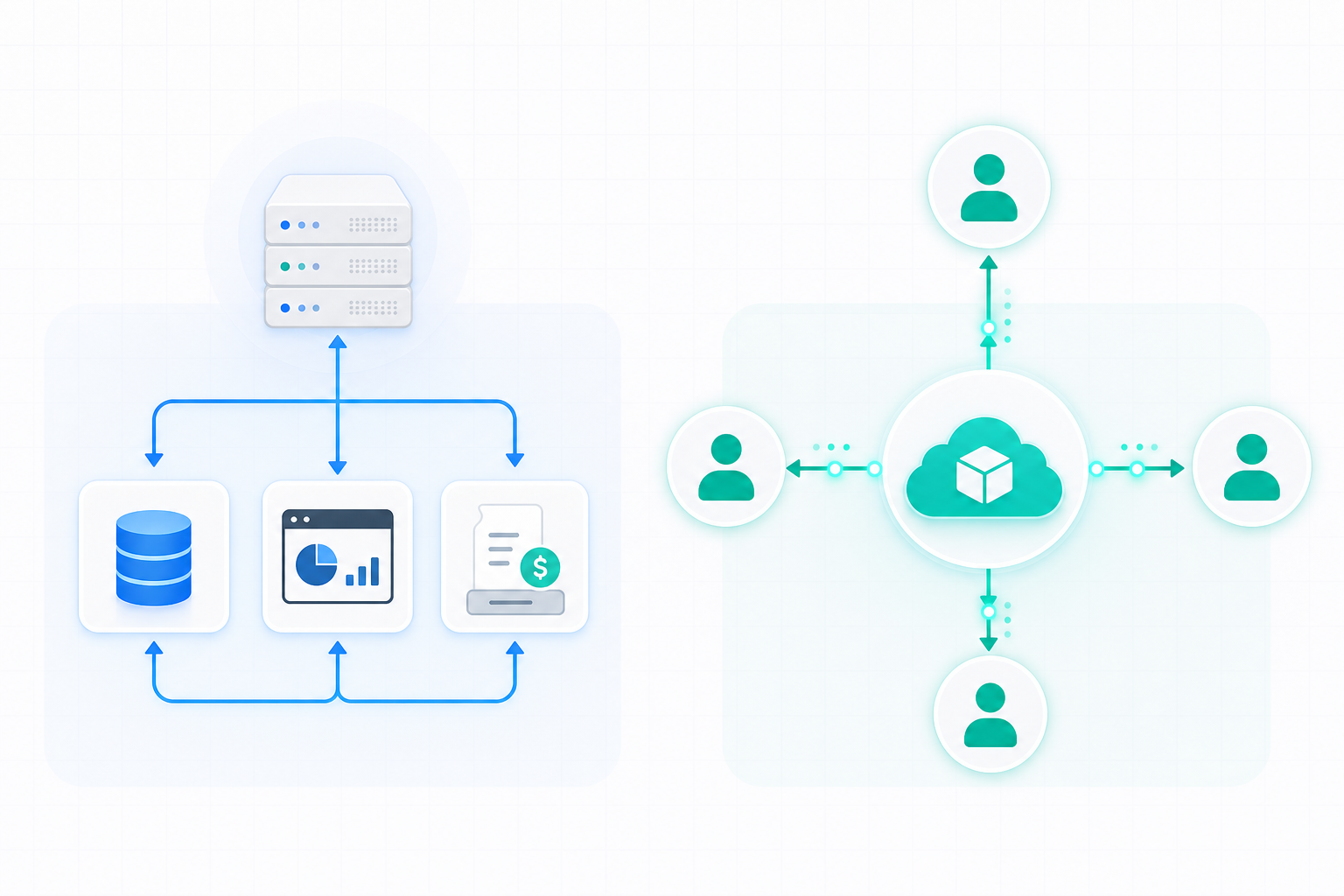
Customer-facing integration is a different category entirely. Your end users connect their own QuickBooks, Salesforce, or Shopify accounts inside your product, often requiring bi-directional integrations. That means multi-tenancy by default, per-customer authentication, isolated data handling, and a white-label UI that feels native to your product. If a customer can see another customer's data, you have a serious problem. These requirements simply do not exist in internal pipelines.
A warehouse-centric ETL tool built for internal analytics will not cleanly support customer-facing use cases without extensive custom engineering around auth, tenant isolation, and UI. Choosing the wrong category early means rebuilding later.
Open-Source Connectors vs. Proprietary Black-Box Connectors
Open-source connectors are built on published specs, primarily Singer and Airbyte YAML, that define how a connector authenticates, paginates, and extracts data. Because the code is public, you can read exactly what a connector does, fork it to add a missing stream, or swap it out if the vendor disappears.
Proprietary connectors live inside the vendor's system. You get a UI that works, but you have no visibility into what's happening underneath. If a connector behaves unexpectedly, you file a support ticket and wait.
Here are the practical tradeoffs worth weighing:
- Open-source connectors offer full code visibility, forkability, and community-maintained options with no black-box surprises during audits, though you may inherit maintenance responsibility if the vendor stops monitoring third-party API changes.
- Proprietary connectors typically offer more polished onboarding and the vendor owns the maintenance burden, but lock-in is real. Migrating connectors if you switch vendors is a rebuild, not an export.
For B2B SaaS teams with compliance requirements, connector transparency matters. Knowing exactly which fields are pulled, and when, is easier when the code is readable.
On-Premise and Legacy System Support
Cloud-native integration tools sidestep on-premise support because it's genuinely hard. Local agents, Windows service installations, direct database connections, and resilience to software updates all add complexity that most vendors prefer to skip.
For SaaS teams serving accounting, construction, or facilities management that need to manage app integrations, that's a real problem. Customers running QuickBooks Desktop, Sage 300 CRE, or older ERPs aren't migrating to cloud versions anytime soon, which is part of why choosing the right accounting platforms to integrate with matters. If your integration layer can't reach those systems, you're building around your customers instead of for them.
When assessing any tool for on-prem support, ask these specific questions:
- Does the connector install directly on the customer's machine, or does it require a cloud intermediary that can't reach the local database?
- Is it resilient to software updates on the customer's end, or does a vendor patch break the sync?
- Does it support Windows agent-based connections, including multi-user environments?
- Who handles installation support when the customer's IT team isn't cooperative?
Many vendors struggle to answer these clearly. That's your signal.
AI Agents and MCP: A New Requirement for Integration Software
Scheduled syncs move data on a clock. AI agents need data right now, in context, mid-conversation. That's a different requirement, and most integration tools weren't built for it.
Model Context Protocol (MCP) is the fast-maturing standard that lets AI tools connect to external systems securely without custom wiring per integration. For B2B SaaS teams shipping AI-native features, customers are already asking whether your product's AI can read their QuickBooks or Salesforce data live, going beyond what landed in last night's sync.

Integration software that supports MCP authentication becomes the secure gateway between an AI agent and each customer's connected systems, with tenant-scoped access so one customer's data never bleeds into another's.
How hotglue Approaches Data Integration for B2B SaaS Products
We built hotglue to solve the customer-facing integration problem, not internal analytics pipelines. Today, hotglue processes approximately 10 billion records weekly across 38,000+ active tenants for 70+ B2B SaaS customers. That's what production-grade embedded integration actually looks like.
A few things we handle differently:
- Tenant-based pricing with tiers starting at 25 connected tenants, scaling up through 250 and 1,000+, so your integration cost grows in line with customer revenue, not data throughput.
- 650+ open-source connectors built on Singer and Airbyte specs, backed by native app integration tools, so you can read the code, fork a connector, or extend coverage without filing a ticket and waiting.
- A Python transformation layer for when field mapping logic gets complex, with separated dev and production environments so nothing accidentally touches live syncs.
- SOC 2 Type II and GDPR compliance by design. We process and deliver data. We never store it.
- Magic Links let your customers authenticate and connect their tools without your engineering team embedding a widget at all.
- The Composite MCP endpoint gives AI agents tenant-scoped access to each customer's connected systems without re-OAuth on every request.
That last point connects the traditional integration layer to the AI-native requirements your product will face. One authenticated endpoint. Every connector your customer linked. No data bleeding between tenants. It's the kind of thing that sounds obvious in hindsight but takes years to build right.
Built for developers, by developers and also for the CPO who's tired of explaining why the QuickBooks connector is still three sprints out. Book a demo and bring your connector list.
Final thoughts on Data Integration Software for Product Teams
The gap between a tool that works in demos and one that holds up across 10,000 tenants is where most integration decisions fall apart. Your customers don't care which vendor powers the sync, but they will notice when it breaks. If you want to see what production-grade embedded integration looks like in practice, book a demo and bring your connector list.
FAQ
How do I let my B2B SaaS customers connect their own ERP or CRM without my engineering team building each connector?
The fastest path is an embedded iPaaS that handles authentication, multi-tenancy, and connector maintenance for you. Hotglue ships new connectors in 1-2 weeks from API access, covers 650+ open-source connectors across QuickBooks, NetSuite, Salesforce, HubSpot, and Shopify, and gives your team a Python transformation layer for any field mapping logic that gets complex.
What embedded iPaaS tools support MCP authentication for AI agents connecting to live business systems?
Most integration tools were built for scheduled syncs, not live agent queries, so MCP support is rare. Hotglue's Composite MCP endpoint gives AI agents tenant-scoped access to each customer's connected systems mid-conversation, without re-OAuth on every request and without one customer's data bleeding into another's.
What is the difference between internal data integration and customer-facing data integration software?
Internal integration connects systems your company owns under a single set of credentials. Customer-facing integration requires multi-tenancy by default, per-customer OAuth, tenant-isolated data handling, and a white-label UI that feels native to your product. A warehouse-centric ETL tool built for internal analytics cannot cleanly cover customer-facing use cases without substantial custom engineering work around auth and tenant isolation.
How do I get customers live with integrations faster without requiring my engineering team to embed a widget?
Hotglue's Magic Link feature lets end users authenticate and connect their tools without any widget embedding on your engineering team's end. It removes the implementation bottleneck for customer success and sales scenarios where speed matters more than a fully embedded UI.
Hotglue vs. building integrations in-house: when does buying actually win?
Buying makes more sense when integrations appear repeatedly on your roadmap and you have limited engineering bandwidth. IT teams already spend roughly 39% of their time on custom integration work, and that's before API endpoint changes, schema drift, and connector rebuilds eat into sprint capacity. If you have ten connectors planned this year and two engineers, the math rarely favors building.